
Facebook Messenger Rooms now live with free video calls for up to 50 people

Throughout all the social distancing (and isolation) we've seen because of the COVID-19 pandemic, Zoom has emerged as a household name, whereas before it was probably best known by some people for being the video conferencing tool at work. As more and more people have been using it for everything but work related purposes, it got to hundreds of millions of active users each day, and Facebook took notice.

The social network thus announced Messenger Rooms a few weeks back, which is basically its response to Zoom's popularity, although aimed squarely at consumer use cases (because there's no screen sharing or other tools that would benefit business settings). Today, Messenger Rooms is starting to go live.
Facebook Messenger Rooms now live with free video calls for up to 50 people

We say "starting" because at the moment we still don't have the functionality, even though it was supposedly turned on globally, so clearly this one of those staged rollouts. Hang in there though, it's coming.

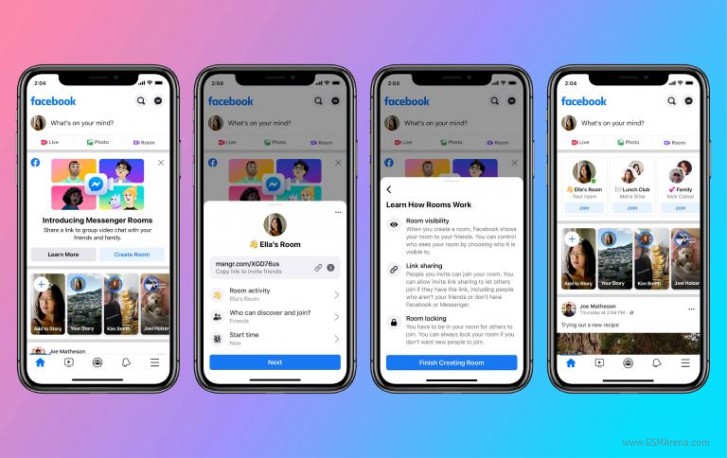
When you have it, you can create a room from Facebook (in North America) or Messenger (globally). You can have up to 50 people on a free video call, with no time limits whatsoever. There's a host/guest system like on Zoom, and you can invite people who don't have a Facebook account (and they won't need to create one in order to join).

You can choose who gets to see and join your room, and remove people from it at any time, or even lock the room if you don't want anyone else to join.

Comments

Popular posts from this blog

Samsung Galaxy A52s 5G review

  Introduction Click here for our  full and extensive review  of the Samsung Galaxy A52 5G, which the Samsung Galaxy A52s 5G is based on. We've said it before, and we'll say it again - Samsung currently has a really strong Galaxy A lineup. They took their "Awesome is for everyone" slogan to heart with interesting and fresh designs, as well as good value specs. Better still, the Korean giant definitely recognizes it has a good product on its hands and is now investing even further in extending its life. Particularly the Galaxy A52, which now has a new A52s 5G variant. Technically, it can be considered another generation of the product, compared to the vanilla A52 and the A52 5G, though there aren't too many new changes here. The first two A52 models came out back in March, with the 5G one swapping the original's Snapdragon 720G for a 5G-capable Snapdragon 750G and the 90Hz, 6.5 Super AMOLED display for a 120Hz one. All the while keeping the two devices physical...

Huawei MatePad Pro 12.6

  Huawei MatePad Pro 12.6 Introduction You are going to hear that it's a new dawn for Huawei thanks to the first public release of HarmonyOS. And the new MatePad tablets are supposed to usher Huawei's products into a Harmony era and drop Android for good. But underneath all this PR talk everything boils down to one thing - can Harmony-operated devices rival Android's and Apple's? We have the MediaPad Pro 12.6 for a review today, and that's what we are going to try and find out. Just because Apple is dominating the tablet market with its iPads, it doesn't mean the competition should disappear. On the contrary, we'd love to see more slates like the Galaxy Tab S7 trio and the newly announced MatePad series. The tablet market might appear as a niche one, but it leads to some incredible UI advancements and some of those inevitably make their way onto phones, too. And today we are thrilled to meet a new large tablet with stylus support and a (supposedly) brand new...

Microsoft announces Windows 11 with updated UI and Android app support

  Microsoft announces Windows 11 with updated UI and Android app support Microsoft today officially announced Windows 11, the next major version of the company's perennial desktop operating system. The new version brings with it several improvements, including a redesigned UI, updated window management features, and even support for Android applications. Right off the bat, the first thing you'd notice is the redesigned taskbar and Start menu. Windows 11 has a macOS style centered taskbar icon placement, eschewing the age-old left-aligned layout of all previous Windows installments. It still keeps the miscellaneous items such as the clocks and icons on the right, which does leave the left side feeling all empty. Front and very much center of this design is the new Start menu, which drops right in the middle with a completely redesigned UI. The new menu has the search bar at the top, along with pinned apps and then a whole bunch of recommended items below. You can still change yo...