
Samsung Galaxy Note 10


Product Description

Introducing Next-level Power
The Galaxy Note 10 is designed to give you the mobile experience of a computer, a gaming console, a movie-tech camera, and an intelligent pen - all in one device. Powered by a 7nm processor, 8 GB of RAM, 256 GB of internal storage capacity and a 2.0 Gbps LTE connection, the Note 10 lets you download files, live-game, and stream content seamlessly.
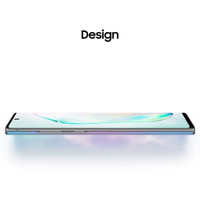
Design
Its stylish design, combined with vibrant hues, makes this smartphone a thing of beauty. With more screen and less interruption, the Note 10 revolutionises your smartphone experience.

On-screen Ultrasonic Fingerprint Scanner for Vault-like Security
The Ultrasonic Fingerprint scanner which is hidden within the screen pulses and detects the 3D ridges and valleys of your fingerprint for invisible security.
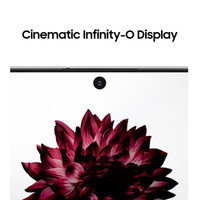
Infinity-O Display for an Uninterrupted View
With the front camera positioned discreetly and tucked out of the way and the bezels pushed way back, the Note 10 lets you experience truly immersive visuals on its 16-cm (6.3) display.

Dynamic AMOLED
Get ready to enjoy a cinema-grade viewing experience on mobile in bright daylight or in the dark. With HDR10+ certification and Dynamic Tone Mapping for playback with tone and contrast, the HDR10+ content that you watch on YouTube will be vivid and exciting.
Stunning Camera
It comes with a (12MP (Dual Aperture) + 12MP + 16MP) camera setup and the powerful Pro-grade technology, giving you with power to not only shoot amazing pictures but also edit them instantly.

Shoot Epic Videos
You can now blur out the backgrounds with video bokeh to add movie-like depth of field for your videos. This smartphone also allows you to add special effects in real time, so you can capture artistic moments which stand out.

Comments

Popular posts from this blog

Samsung Galaxy A52s 5G review

  Introduction Click here for our  full and extensive review  of the Samsung Galaxy A52 5G, which the Samsung Galaxy A52s 5G is based on. We've said it before, and we'll say it again - Samsung currently has a really strong Galaxy A lineup. They took their "Awesome is for everyone" slogan to heart with interesting and fresh designs, as well as good value specs. Better still, the Korean giant definitely recognizes it has a good product on its hands and is now investing even further in extending its life. Particularly the Galaxy A52, which now has a new A52s 5G variant. Technically, it can be considered another generation of the product, compared to the vanilla A52 and the A52 5G, though there aren't too many new changes here. The first two A52 models came out back in March, with the 5G one swapping the original's Snapdragon 720G for a 5G-capable Snapdragon 750G and the 90Hz, 6.5 Super AMOLED display for a 120Hz one. All the while keeping the two devices physical...

Huawei MatePad Pro 12.6

  Huawei MatePad Pro 12.6 Introduction You are going to hear that it's a new dawn for Huawei thanks to the first public release of HarmonyOS. And the new MatePad tablets are supposed to usher Huawei's products into a Harmony era and drop Android for good. But underneath all this PR talk everything boils down to one thing - can Harmony-operated devices rival Android's and Apple's? We have the MediaPad Pro 12.6 for a review today, and that's what we are going to try and find out. Just because Apple is dominating the tablet market with its iPads, it doesn't mean the competition should disappear. On the contrary, we'd love to see more slates like the Galaxy Tab S7 trio and the newly announced MatePad series. The tablet market might appear as a niche one, but it leads to some incredible UI advancements and some of those inevitably make their way onto phones, too. And today we are thrilled to meet a new large tablet with stylus support and a (supposedly) brand new...

Windows 11 will finally introduce advanced multi-monitor settings

  Windows 11 will finally introduce advanced multi-monitor settings Windows 10 has been around for a while but little has been done to improve the multi-monitor experience for users. And using more than one monitor in 2021 isn't a rare thing too. A growing number of users have asked Microsoft to do something about it in the Feedback Hub and we can finally see the company making some efforts. In the leaked Windows 11 build, there's an option that allows the OS to remember each window location based on the monitor connection. This means that if you leave a bunch of windows opened on both monitors, once you re-connect a display or when you wake up the PC. This should potentially fix the issue of moving random windows or tabs or cramming up all the opened apps on one of the monitors. Additionally, once you disconnect one of your monitors, instead of moving the program to the still plugged monitor, the OS will minimize the app to the tray.